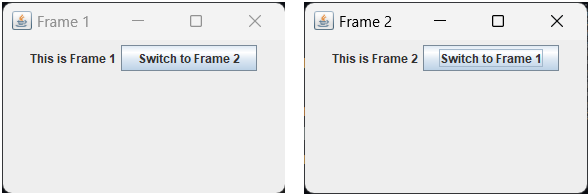
9.Java Program to Create and Switch between Frames using Buttons
💡Code:
                import javax.swing.*;
import java.awt.*;
import java.awt.event.ActionEvent;
import java.awt.event.ActionListener;

class SwitchFrame {

public static void main(String[] args) {
createAndShowGUI();
}

private static void createAndShowGUI() {
// Create the first frame
final JFrame frame1 = new JFrame("Frame 1");
frame1.setSize(300, 200);
frame1.setDefaultCloseOperation(JFrame.EXIT_ON_CLOSE);

final JFrame frame2 = new JFrame("Frame 2");
frame2.setSize(300, 200);
frame2.setDefaultCloseOperation(JFrame.EXIT_ON_CLOSE);

JButton switchButton1 = new JButton("Switch to Frame 2");
switchButton1.addActionListener(new ActionListener() {
@Override
public void actionPerformed(ActionEvent e) {
// Switch to Frame 2
frame1.setVisible(false);
frame2.setVisible(true);
}
});

frame1.setLayout(new FlowLayout());
frame1.add(new JLabel("This is Frame 1"));
frame1.add(switchButton1);

// Create the second frame

JButton switchButton2 = new JButton("Switch to Frame 1");
switchButton2.addActionListener(new ActionListener() {
@Override
public void actionPerformed(ActionEvent e) {
// Switch to Frame 1
frame2.setVisible(false);
frame1.setVisible(true);
}
});

frame2.setLayout(new FlowLayout());
frame2.add(new JLabel("This is Frame 2"));
frame2.add(switchButton2);

// Initially, set Frame 2 to be invisible
frame2.setVisible(false);

// Show the first frame
frame1.setVisible(true);
}
}
📸Output :